STRUCTURE
Read CSV without losing the record
A small inventory example explains quoted commas, multiline fields, empty cells and the difference between a line and a record.

A table can look tidy on screen while its text representation carries details that are easy to flatten. A comma in an item name is not a new column. A line break in a note is not necessarily a new record. The useful first step is to decide which boundaries are real.
Open CSV Table Lab and load the fictional inventory. It is deliberately small: one heading record and four data records. Its item identifiers have leading zeros, one note contains quotation marks, another spans two physical lines, and the final quantity is empty. Those details make a better inspection exercise than a long, tidy list.
Start with one record you can explain
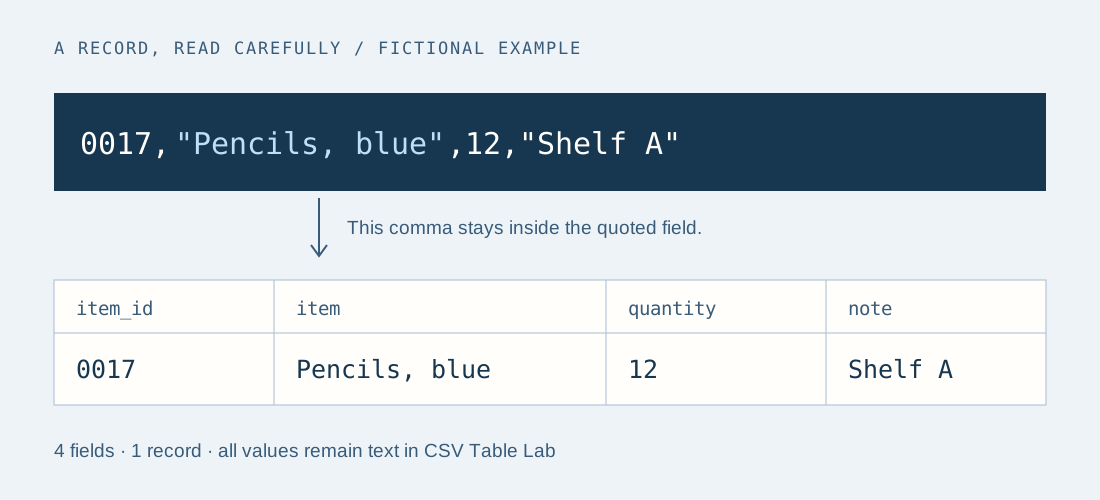
In the fictional sample, record 2 begins with the identifier 0017. It has four fields: the identifier, the item name, a quantity and a note. The item name is Pencils, blue; its comma belongs inside the name. In the source text the field is enclosed in double quotes to preserve that boundary.
RFC 4180 describes a common CSV format with comma-separated fields, optional quoted fields and an optional heading record. A double quote within a quoted field is represented by two double quotes. Its record separator is CRLF. The lab also accepts LF and CR record breaks, and reports the separators it actually found.
Sources: RFC 4180 — Common Format and MIME Type for CSV Files
Compare record count with physical lines
The sample’s paper note contains First line and Second line in one quoted field. Counting each visible newline as a new row would create a fifth inventory item that does not exist. The lab instead shows four data records when the heading option is on.
Try moving the closing quote to an earlier point, then inspect again. The resulting width error is useful: it tells you which logical record no longer has the expected number of fields. Keep a copy of the original before experimenting. Do not delete a line simply because the preview appears uneven.
| Detail | Expected result |
|---|---|
| Heading option on | 4 data records; 4 columns |
| Item identifier | 0017 remains the string 0017 |
| Item name | Pencils, blue occupies one cell |
| Paper note | Two lines remain inside one cell |
| Folder quantity | An empty string, distinct from the earlier 0 |
Keep an empty cell separate from a missing field
The folder has no recorded quantity. Its row still needs four fields. The consecutive commas in 0020,Folder,,"" explicitly leave quantity empty and put an empty note after it. If you remove one comma, the shape changes: the lab reports three fields where four were expected.
An empty string does not by itself tell a recipient whether a value is unknown, not applicable or withheld. The lab deliberately preserves the empty string. Add that meaning to a handoff note rather than converting every empty cell to a zero. The W3C tabular model distinguishes table structure from annotations about cells and columns.
Sources: W3C — Model for Tabular Data and Metadata on the Web
Read an error as a location, not a repair instruction
The lab identifies errors by record and field, not by the physical line number in a text editor. An unclosed quote, an unexpected quote in an unquoted value and trailing text after a closing quote each need a different correction. The tool stops instead of guessing which characters to remove.
If a quoted field ends with a quote followed by a space and then a comma, this lab rejects it. That is an explicit dialect choice: it will not silently discard the space. Confirm the exporting application’s rules before changing the file. If every record appears to have one field, the source may use tabs or semicolons; this tool does not auto-detect them.
Check a round trip at the cell level
Inspect the source, export raw normalized CSV text, then paste that text back into the lab. Compare the parsed cell values and record count. Raw normalization writes each field in quotes and uses CRLF between records, so its bytes may differ even when its values do not. Embedded line breaks remain part of their cell values.
Use the downloadable worksheet to record the input dialect, heading decision and observations. For the fictional sample, the questions are concrete: did 0017 keep its zeroes, did the comma stay within the item name, and did the empty quantity remain empty? Passing those checks supports this small handoff only; it does not validate the business meaning of every record.